

My Domain Controller Went Back in Time and Nobody Noticed for Eighteen Days
 Kev Johnson
9 min read
Kev Johnson
9 min read

I pretty much talk about Active Directory recovery for a living. I have stood on stages and explained USN rollback with nice (even if I do say so myself) diagrams.
And yet, this week I spent the best part of a day recovering my own lab domain one.
I am writing it up for two reasons. The first is that the failure was more interesting than the textbook version, because it did not announce itself. It sat there, quietly, for the best part of three weeks, and then fell over all at once for a reason that had nothing to do with the original fault. The second is that it reminded me of something I think matters a lot for anyone whose job has drifted away from the keyboard: you have to stay close to the tech, because the gap between knowing how something works and knowing how it fails is only closed by having your hands on it.
Perhaps I need to up my monitoring game...
The setup
My lab runs a small Active Directory domain with three domain controllers, DC1, DC2 and DC3, all as VMs on my Harvester cluster. They are also the DNS servers for the domain, with AD-integrated zones. At the time DC2 held the PDC emulator role. Nothing exotic. The kind of setup thousands of small environments run.
What happened, in order
At around 13:50 on 11 October, DC2 went back in time. Its last good replication with its partners was between about 13:49 and 13:54 that afternoon, and then its database was suddenly older than the one its partners remembered. I still do not know exactly what caused it. The most likely explanation is a VM revert or restore somewhere in the stack, and finding out is still on my list.
The following afternoon, DC1 noticed. It logged Directory Service event 2095, which is AD's way of saying "a partner just told me a USN I have already seen, so something has rolled back". The numbers in that event were close together, a few dozen updates apart, which is part of why it looked so harmless.
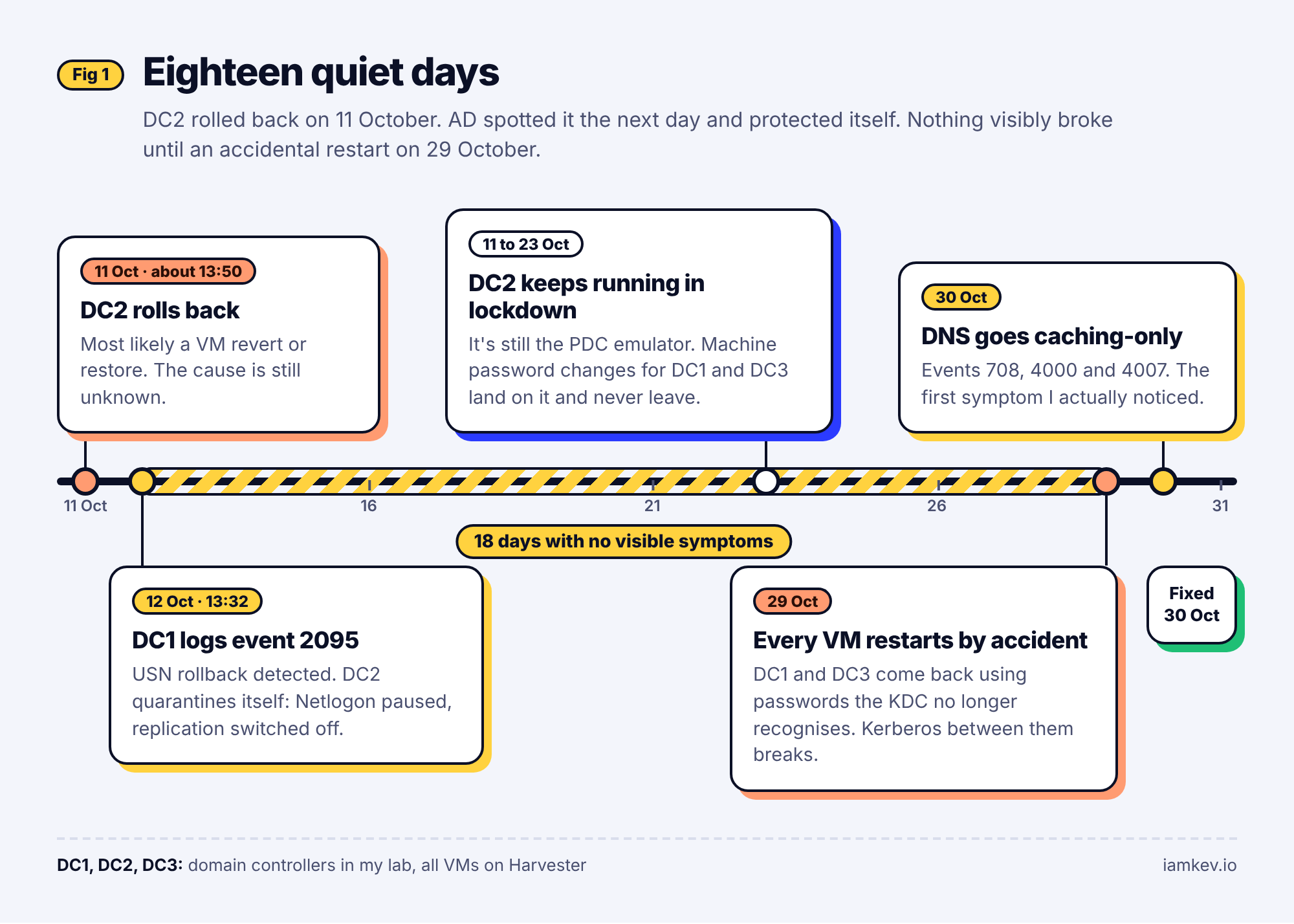
What happens next is AD doing exactly what it is designed to do. The rolled-back DC protects the rest of the domain by quarantining itself. Netlogon is paused, inbound and outbound replication are disabled, and a registry value called DSA Not Writable is set so that the DC stops accepting changes. Microsoft are clear that you should not try to undo that flag by editing the registry. The DC is now considered permanently inconsistent, and the supported fix is to remove and rebuild it, or restore it from a proper backup.
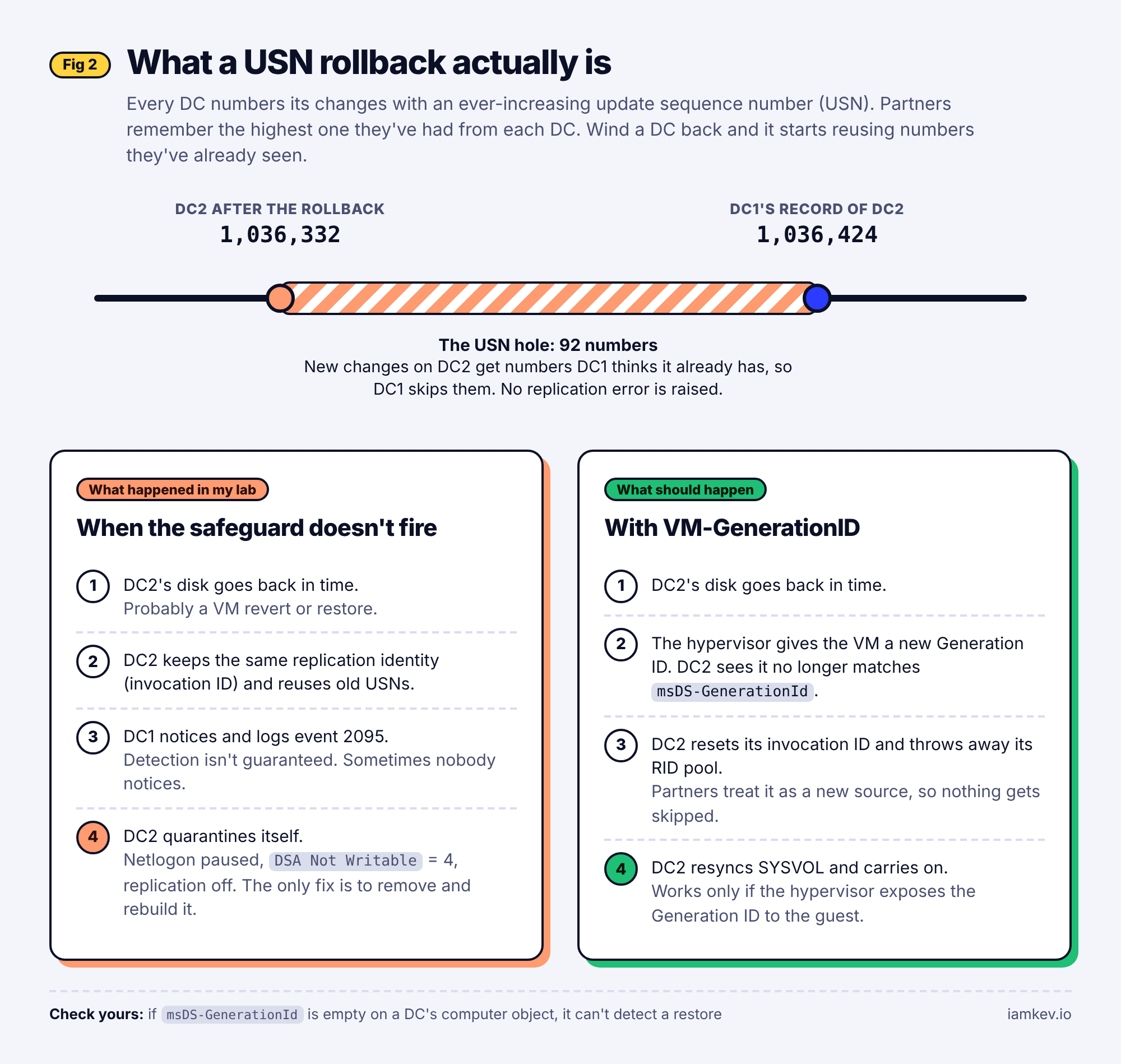
So far, so textbook. Here is where my lab went off script.
DC2 was not switched off. It was quarantined, but it was still running, still answering some requests, and still the PDC emulator. Over the next couple of weeks, DC1 and DC3 went about their normal business, and that included changing their own machine account passwords. Those changes ended up on DC2, which, being in lockdown, never replicated them anywhere. They were lost. Meanwhile DC1 and DC3 carried on happily using cached tickets and existing secure channels, so nothing visibly broke.
Then on 29 October I accidentally shut down and restarted every VM in the lab. Fat finger stuff. Were this production, it might have been one of those infamous RGEs (or CVGE if you're on my side of the pond. Now I put it like that, this feels more like my kind of acronym)
When DC1 and DC3 came back, they presented their current machine passwords to the KDC, and the KDC did not recognise them. Kerberos between the two healthy domain controllers broke. On 30 October DC1's DNS service could no longer open its AD-integrated zones and fell back to behaving as a caching-only server. That is the point at which I noticed, because name resolution across the lab started going sideways.
Eighteen days from the rollback to the first symptom I actually saw. And the symptom I saw was DNS, three steps removed from the cause. Had I not fat-fingered that shutdown, it could have been months, and if that were the case, so much worse.
Reading the symptoms
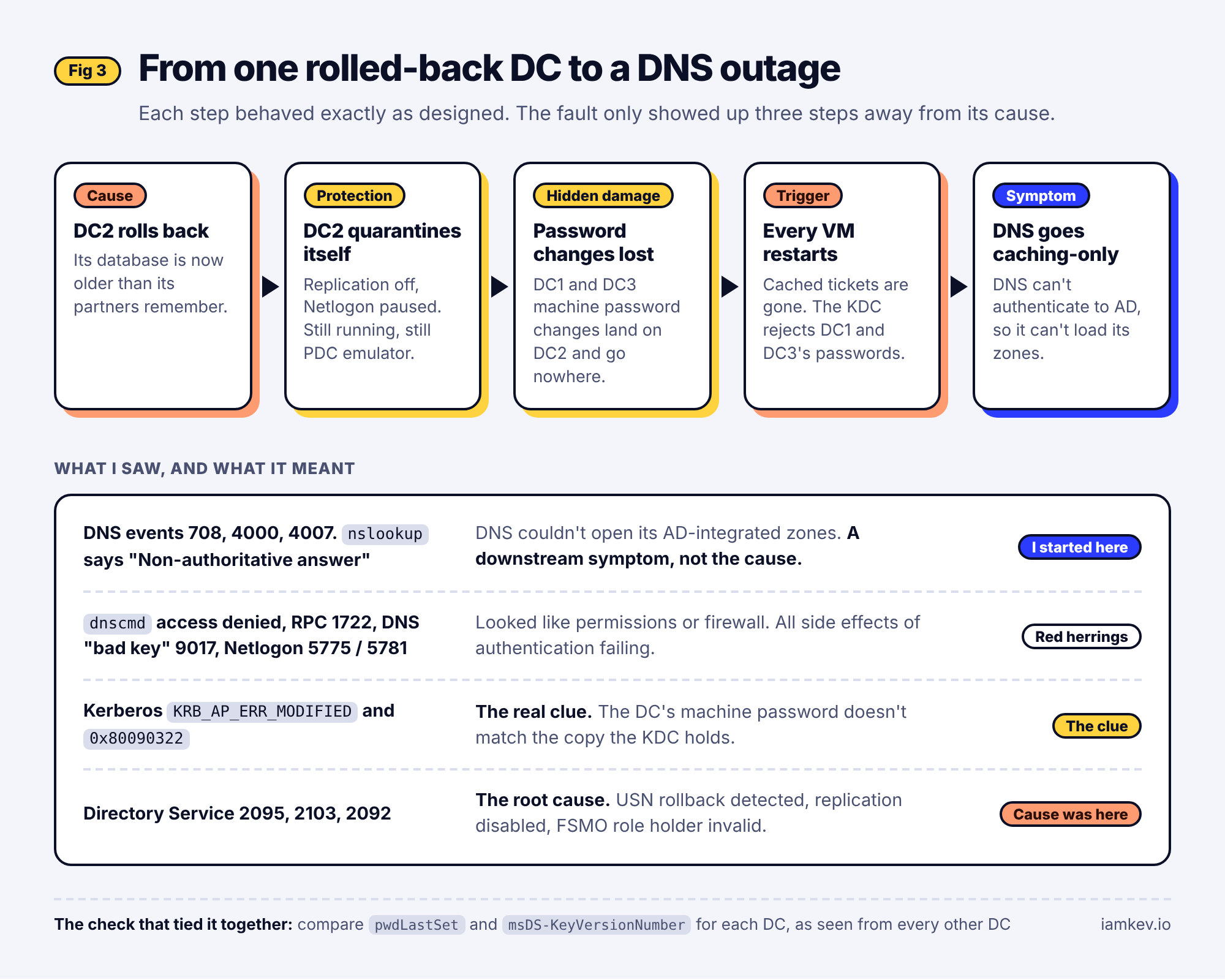
The thing that made this a good learning exercise was how many different errors pointed at the same fault, and how few of them said so.
DNS logged events 708, 4000 and 4007, and nslookup started returning non-authoritative answers. That looks like a DNS problem. It is not; DNS simply could not authenticate to AD to read its zones. Trying to inspect the zones with dnscmd or Get-DnsServerZone gave access denied or RPC unavailable, which looks like a permissions or firewall problem. It is not either. Secure dynamic updates failed with "bad key" errors, and Netlogon logged 5775 and 5781. Event 1722, RPC server unavailable, is usually a firewall or a stopped service. Here it was a side effect of the lockdown.
The two that actually told the truth were Kerberos error 4, KRB_AP_ERR_MODIFIED, and the related 0x80090322 "target principal name is incorrect". Both mean the same thing in this context: the password a machine is using is not the one the KDC holds for it. Alongside them, the Directory Service log had 2095 from earlier, plus 2103 and 2092, which tell you AD has disabled replication to protect itself and that a FSMO role holder is no longer valid.
The diagnostic that tied it together was comparing pwdLastSet and msDS-KeyVersionNumber on each DC's computer object, as seen from each of the other DCs, with repadmin /showattr. When those values differ depending on which DC you ask, the machine passwords have diverged. And repadmin /options on DC2 showing DISABLE_INBOUND_REPL and DISABLE_OUTBOUND_REPL confirmed which machine had rolled back.
The fix, and the order mattered
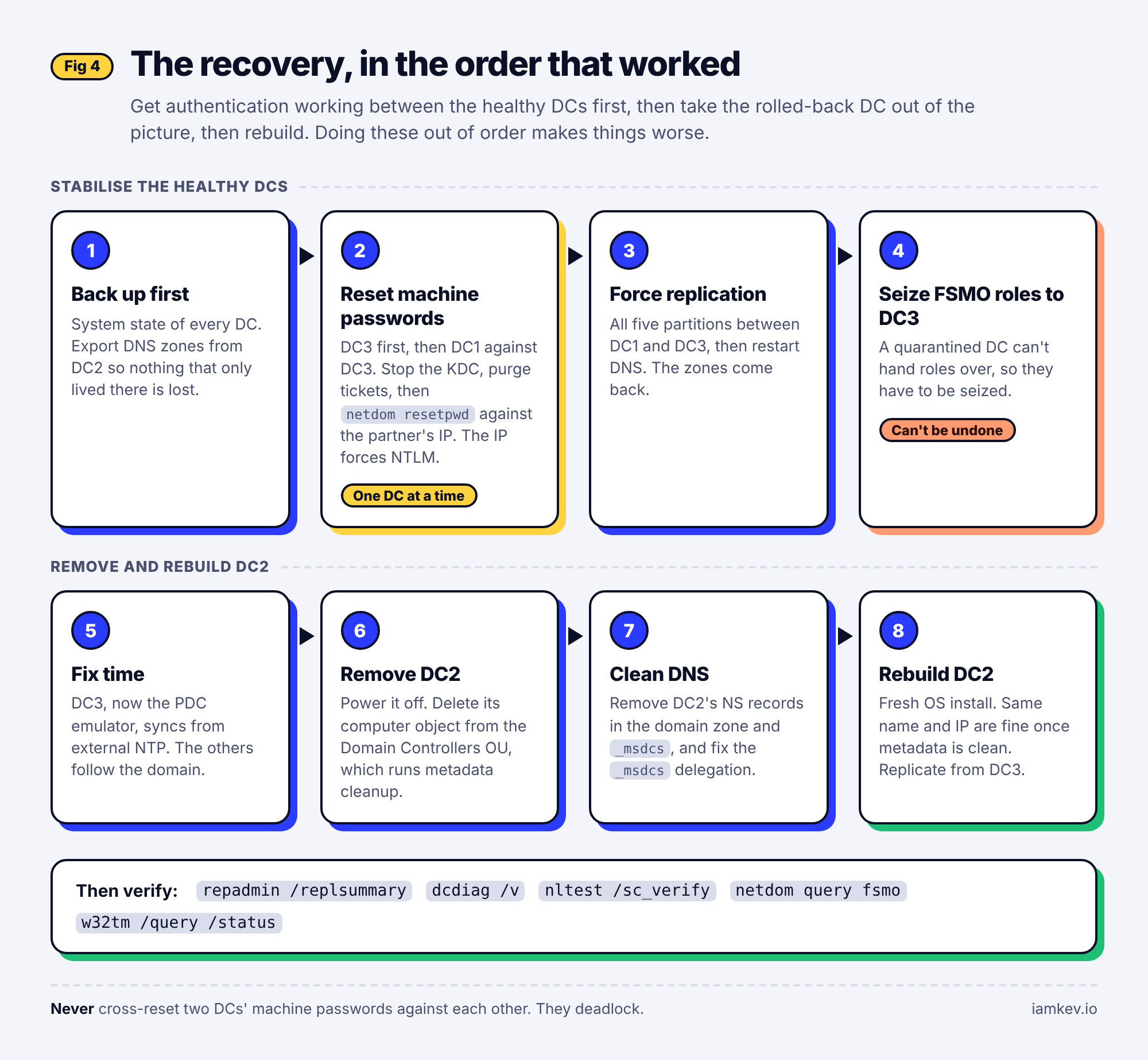
I am not going to reproduce the full runbook here, but the sequence is the interesting part, because getting it wrong makes things worse.
First, back everything up. Yeah, sure, the guy who spends his life talking about identity resilience, we've heard this all before.
A system state backup of every DC, and an export of the DNS zones from the rolled-back DC, so that anything that only existed there could be checked rather than lost.
Second, fix the machine passwords, one healthy DC at a time. I picked DC3 as the anchor. On it, I stopped and disabled the KDC so it would stop using its bad key, purged its Kerberos tickets including the machine's own, and reset its machine password with netdom resetpwd against a partner. The detail that matters is that you point netdom at the partner by IP address, not by name. Using the IP forces NTLM, which still works when Kerberos is broken. Then re-enable the KDC. Then do DC1, against DC3. Not DC1 against DC3 and DC3 against DC1 at the same time; cross-resetting the two against each other just deadlocks.
powershell
# On the DC being fixed (run DC3 first, then DC1 against DC3)
Stop-Service KDC; Set-Service KDC -StartupType Disabled
klist purge; klist -li 0x3e7 purge
netdom resetpwd /server:<healthy-partner-IP> /userd:<DOMAIN\admin> /passwordd:*
Set-Service KDC -StartupType Automatic; Start-Service KDC
Third, force replication between the healthy DCs for every partition (domain, configuration, schema and both DNS application partitions) and restart DNS. At that point the zones came back.
Fourth, seize the FSMO roles to DC3. You cannot transfer them from a quarantined DC, so this is a seize, which is a one-way door: the old holder must never come back online with those roles.
Fifth, fix time. DC3 now syncs from external NTP and the others follow the domain hierarchy. With the PDC emulator moving, it is easy to end up with no authoritative time source at all.
Sixth, remove DC2 properly: power it off, delete its computer object from the Domain Controllers OU (which runs metadata cleanup for you on modern Windows Server), and then clean DNS of everything that still pointed at it, including the NS records in the domain zone and in _msdcs, and the _msdcs delegation itself.
Finally, rebuild DC2 from scratch: a fresh OS install, the same name and IP (which is fine once metadata is clean), promoted with DC3 as its replication source. Then verify everything: repadmin /replsummary clean, dcdiag clean including the DNS tests, secure channels verified with nltest, every AD-integrated zone present on every DC, SYSVOL replicating, FSMO roles where I intended, and time coming from the right place.
What I would tell my past self
Never revert, restore or fail over a domain controller from a VM snapshot or a replica. Rebuild it, or restore it from a proper system state backup. I knew that. I still ended up here, which is the point. When I'm back from my current travels, digging through the SIEM to establish exactly what happened is high on my list of priorities.
Find out what can roll back a DC in your stack, and audit it. Snapshot schedules, VM backup jobs that offer "restore in place", replication and failover features. In my case I still haven't identified the trigger, and an unexplained rollback is a worse place to be than an explained one. I'll do better, when I have a little more free time.
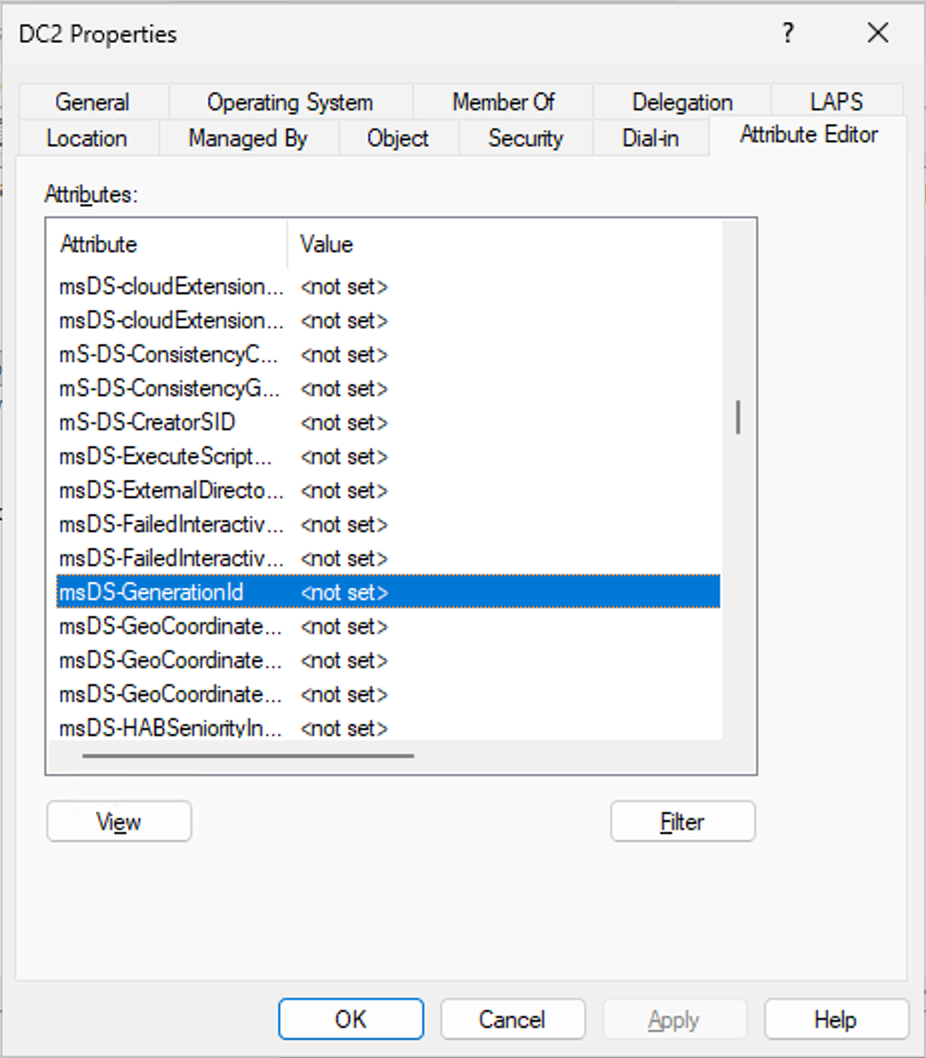
Check that VM-GenerationID actually works on your hypervisor. Since Windows Server 2012, AD has had a safeguard for exactly this: if the hypervisor exposes a VM Generation ID and it changes on restore, the DC resets its invocation ID and discards its RID pool, and the rollback becomes harmless (Microsoft's explanation is here). But it only works if the hypervisor supports it. Hyper-V and vSphere do; Proxmox exposes it as a VM option. I believe that KubeVirt/QEMU/KVM supported this, but it seems that this is not enabled in my specific lab, so I need to do some further investigation. A quick way to check any platform is to look at the msDS-GenerationId attribute on a DC's computer object (you may need to enable Advanced Features under View in ADUC to see this) in . If it is empty, your DC has no idea it can be time travelled. See Exhibit A below.
Turn off hypervisor time sync for DC VMs, and be deliberate about which DC is your time source.
Have system state backups of at least two DCs. A snapshot is not that.
And if you ever see event 2095, take it seriously that day. Do not try to re-enable replication on the affected DC. Seize the roles, remove it, rebuild it, and check the machine passwords on everything else while you are at it.
Why I keep a lab
But this post isn't really about USN rollback, there's tons of those out there already, and great docs that detail how to troubleshoot and recovery from it. It is about the distance between knowing and doing.
I could have explained USN rollback to you three weeks ago. What I could not have told you was that a quarantined PDC emulator left running would quietly eat its partners' machine password changes, that the first thing you would see would be DNS, that pointing netdom at an IP rather than a name is what gets you out of a Kerberos deadlock, or that cross-resetting two DCs against each other locks them both. That kind of intel tends not to be included in slideware. All of it is what you need at two in the afternoon when name resolution is failing and you are not sure why.
At least this was a lab, and not 2 in the morning in prod, right?
As people move into architecture, presales, product marketing, leadership, any role where the work becomes explaining things rather than running them, that gap widens quietly. Your mental model stays tidy because nothing ever tests it. Then a customer asks a question that starts with "what actually happens when", and you realise your answer is a diagram rather than a memory.
So keep a lab. Break it. Better still, let it break on its own and do not reach for the reset button straight away. Recovery is where the understanding lives, and you cannot build it by reading about it.
What is the last thing that broke in your lab that taught you more than the documentation did? Or are you one of those real mean who only test in prod?